¶ Frequently Asked Questions (FAQs)
What is the process we need to go through so we can start selling in live environment?
- Upon reaching an agreement with our Marketing Department, the Support Team will provide you with the credentials for the test environment account. You will receive separate login details, including a Username and Password, for both the Portal User and the API User.
- Once you have completed the integration on your end, please notify us, and we will provide you with an Excel file containing various itinerary scenarios. After successfully executing these scenarios and receiving our confirmation, our Marketing Team will initiate the process of generating live environment credentials for you.
- Subsequently, the Support Team will share the live environment account credentials for both the Portal User and API User, enabling you to integrate seamlessly and commence your sales operations.
How can we check API connectivity?
If you receive connection, timeout, or SSL/TLS errors while calling the API, you can use the following cURL commands to check whether the API endpoint is reachable.
- Check endpoint availability
curl -I https://apitest.biletbank.com/TrevooWS.svc?singleWsdl
curl -I https://api.biletbank.com/TrevooWS.svc?singleWsdl
This command checks if the service is accessible and returns the HTTP status code.
- Check SSL/TLS connection details
curl -v --tlsv1.3 https://apitest.biletbank.com/TrevooWS.svc?singleWsdl
curl -v --tlsv1.3 https://api.biletbank.com/TrevooWS.svc?singleWsdl
This command shows detailed connection and SSL/TLS information.
Notes: If these commands work, the API is reachable. If they fail, please check your network, firewall, or TLS settings.
Does Biletbank has any search rules?
- Overview
To ensure optimal system performance and stability, BILETBANK partners are required to follow best practices when using the Airsearch method. Improper usage, especially making repeated Airsearch calls within the same session, can lead to system instability and errors.
There are two valid usage types for Airsearch:
1. SearchOnly: For cache or informational purposes.
2. SearchAndBook: For reservation and ticketing purposes.
Regardless of the intent, each Airsearch call must be performed in a separate session. This means every Airsearch requires a new Login.
- General Rules
- One session (Login) must be used for one and only one Airsearch call.
- If second search is needed, this new search must be done in a new session initiated withLogin.
- UseSearchOnlyif your intention is only to retrieve and cache flight information.
- UseSearchAndBookif your intention is to proceed with reservation and ticketing.
- Each usage type must be executed in its own session initiated with a newLogin.
1.SearchOnly Usage
Used for informational or caching purposes only. Do not proceed with booking actions. This parameter should be used when you want to make caching or if you make numerous search for testing purposes.
¶ Steps:
- Initiate a new session with
Login. - Perform Airsearch with the following parameters:
<trev:ExtraParamList>
  <trev:ExtendedData>
    <trev:Name>SearchReason</trev:Name>
    <trev:Value>SearchOnly</trev:Value>
  </trev:ExtendedData>
</trev:ExtraParamList>
- Do not proceed with
Allocateor any booking methods.
2.SearchAndBook Usage
Used when the intention is to continue with booking and ticketing.
¶ Steps:
- Initiate a new session with
Login. - Perform Airsearch with the following parameters:
<trev:ExtraParamList>
  <trev:ExtendedData>
    <trev:Name>SearchReason</trev:Name>
    <trev:Value>SearchAndBook</trev:Value>
  </trev:ExtendedData>
</trev:ExtraParamList>
- Proceed with
Allocateand subsequent booking methods.
Recommended Flow Diagram
(SearchOnly Usage)
Login
  |
  |---> Airsearch
           Parameters:
             SearchReason
             SearchOnly
  |
  ---> End (Do not proceed to Allocate)

(Need another Airsearch?)
  |
  ---> Start new Login

-----------------------------

(SearchAndBook Usage)
Login
  |
  |---> Airsearch
           Parameters:
             SearchReason
             SearchAndBook
  |
  ---> Proceed to Allocate, MakePreBooking, etc.

(Need another Airsearch?)
  |
  ---> Start new Login
Important Notes
- Do not perform more than one Airsearch per session under any circumstance.
- Both
SearchOnlyandSearchAndBookflows must follow the rule of one Airsearch per Login. SearchOnlyandSearchAndBookmust be executed in separate sessions.- Incorrect usage, such as reusing a session for multiple Airsearches or skipping the required
SearchReason, will lead to system errors.
What is the structure of a MakePrebooking request?
-
In some cases you may need to add 1 or 2 more fields in the request(like when there are more than 1 ProductId,or when there are some BrandedFareItemId fields) but here is the common sample of MakePrebooking request fields you need to write in the request.
-
In below code example request, you may see the
Valuefield of IntendedShoppingFileId. You may find this field's guid value inside UpdatePassengers response. You need to map thisValuefield with TheIdfield of the ShoppingFile field.
Value(MakePrebooking request) = ShoppingFile.Id(UpdatePassengers response)
<soapenv:Envelope xmlns:soapenv="http://schemas.xmlsoap.org/soap/envelope/" xmlns:i="http://www.w3.org/2001/XMLSchema-instance" xmlns:tem="http://tempuri.org/" xmlns:trev="http://schemas.datacontract.org/2004/07/Trevoo.WS.Entities.Base" xmlns:trev1="http://schemas.datacontract.org/2004/07/Trevoo.WS.IO.Shopping" xmlns:trev2="http://schemas.datacontract.org/2004/07/Trevoo.WS.Entities.Transfer" xmlns:arr="http://schemas.microsoft.com/2003/10/Serialization/Arrays">
	<soapenv:Header/>
	<soapenv:Body>
		<tem:MakePrebooking>
			<tem:request>
				<trev:AuthenticationHeader>
					<trev:SessionId>7160861</trev:SessionId>
					<trev:SessionToken>3c0f93c3-1edb-43a3-a744-da5c03724a54</trev:SessionToken>
				</trev:AuthenticationHeader>
				<trev:ExtraParamList>
					<trev:ExtendedData>
						<trev:Name>IntendedShoppingFileId</trev:Name>
						<trev:Value>52c137c2-18ac-4e29-9f86-a814a4f0e37f</trev:Value>
					</trev:ExtendedData>
					<trev:ExtendedData>
						<trev:Name>DoReservation</trev:Name>
						<trev:Value>True</trev:Value>
					</trev:ExtendedData>
				</trev:ExtraParamList>
				<trev1:Form>
					<trev1:Branded>
						<trev1:IO_Air_Branded_Form>
							<trev1:BrandedFareItemId>1750d000-0d26-41ce-8adf-a368d12d294a</trev1:BrandedFareItemId>
							<trev1:ProductId>08c98a90-ef84-4f2c-9cd8-50401cf4bcf3</trev1:ProductId>
						</trev1:IO_Air_Branded_Form>
					</trev1:Branded>
					<trev1:CIPRequest/>
					<trev1:ExtraForm>
						<trev1:SelectedServiceFee>0</trev1:SelectedServiceFee>
					</trev1:ExtraForm>
					<trev1:ProductIds>
						<arr:guid>08c98a90-ef84-4f2c-9cd8-50401cf4bcf3</arr:guid>
					</trev1:ProductIds>
				</trev1:Form>
			</tem:request>
		</tem:MakePrebooking>
	</soapenv:Body>
</soapenv:Envelope>
-
There are also some things you need to pay attention in Makeprebooking method.First of all please do not forget to add the ExtraParamList fields.When you do not write these fields,the response may return
Status= PreBookingReservation. If the Status = PreBookingReservation, then you cannot make any reservation or you cannot call some ancillary methods(you may get error in the response of a method like PokeShoppingFile).You have to move to payment methods after that. -
However if you write ExtraParamList fields,then you may have the chance to have
Status= Reservation,so that you can either call some ancillary methods(like PokeShoppingFile) and you may choose to make payment later. -
Moreover when you write ExtraParamList fields in the request,it is still not guarantee that you may have
Status= Reservation.Because before that,you need to make sure that you have eitherCanBeReserved= true orIsReservable= true fields for the Product/s you want to choose.These fields and their values can be seen in Airsearch method and in other main methods after Airsearch.
For a Turkish domestic flight,how to fill Updatepassengers for the following fields like CitizenNo,PassportNo,etc?
¶ 🛫 Domestic Flight Bookings in Turkey
¶ 🇹🇷 Turkish Passengers
- National ID Number: You may input 11 zeros (
00000000000) if the actual ID number is not available. - Passport Number: You need to input the word
"None". - Nationality: You need to input the word
"TR". - Passport Country: You need to input the word
"TR".
¶ Sample XML
<a:CitizenNo>00000000000</a:CitizenNo>
<a:Nationality>TR</a:Nationality>
<a:PassportCountry>TR</a:PassportCountry>
<a:PassportNo>None</a:PassportNo>
¶ 🌍 Foreign Passengers
- National ID Number: You need to input 11 zeros (
00000000000). - Passport Number: You need to input the word
"None". - Nationality: Should be the correct 2-letter country code (e.g.,
"BG"for Bulgaria,"NL"for Netherlands). - Passport Country: Should match the nationality (e.g.,
"BG","NL").
¶ Sample XML
<a:CitizenNo>00000000000</a:CitizenNo>
<a:Nationality>BG</a:Nationality>
<a:PassportCountry>BG</a:PassportCountry>
<a:PassportNo>None</a:PassportNo>
I see the currency in TRY(Turkish Lira) only.But we are doing business in another currency.How can we display the prices of the currency we are dealing with to our clients?
-
You are right that our system shows the prices in Turkish Lira only.However you have the opportunity to convert the Turkish Lira to the desired currency.There are 2 ways to do this:
1) In the response in every method you can see 2 fields:
ExchangeCurrencyCode:This is the 3-letter code of the desired currency.(Example: USD, EUR)
ExchangeCurrencyRate:This is the ratio of the currency.(Example:USD/TRY=38,02)
Please note that these 2 fields will show you only the ratio of the currency that your account was first created. In the beginning of creating your account, if we created the account as USD by your request, then you will see USD conversion rates here.You will not see any other currencies in here.
2) You can get the conversion ratios by calling GetCurrentXRate method inside our web service. We can send a sample of this method if you contact us.Please note that you need to make conversions with the SellingRate field after you call this method.You can see most currencies by using this method.
Does your API support Change/Cancellation/Refund or any other requests for a PNR or Ticket?
-
For the moment our API does not support such transactions to be made if there is a Booking(If the Status=Booking, if there are tickets). You can use our Biletbank Portal for such requests. You can do these by following these steps:
-
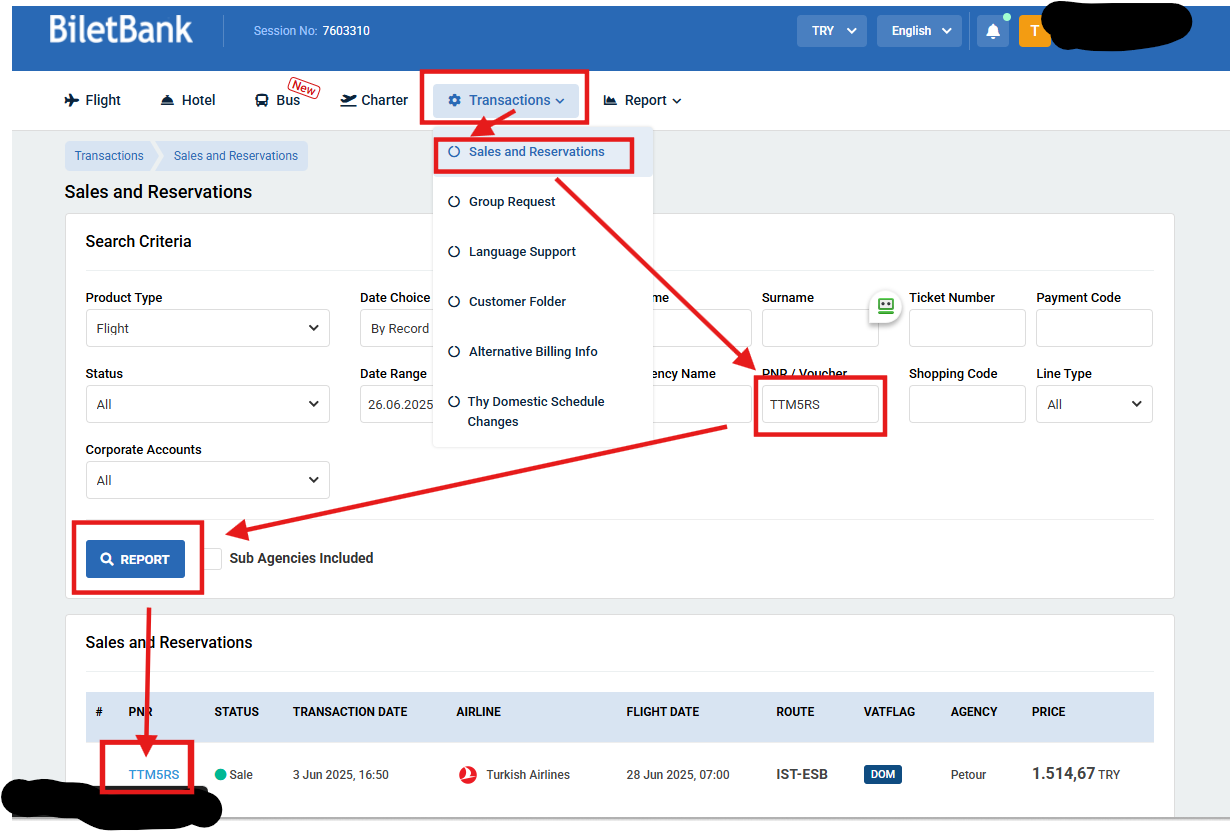
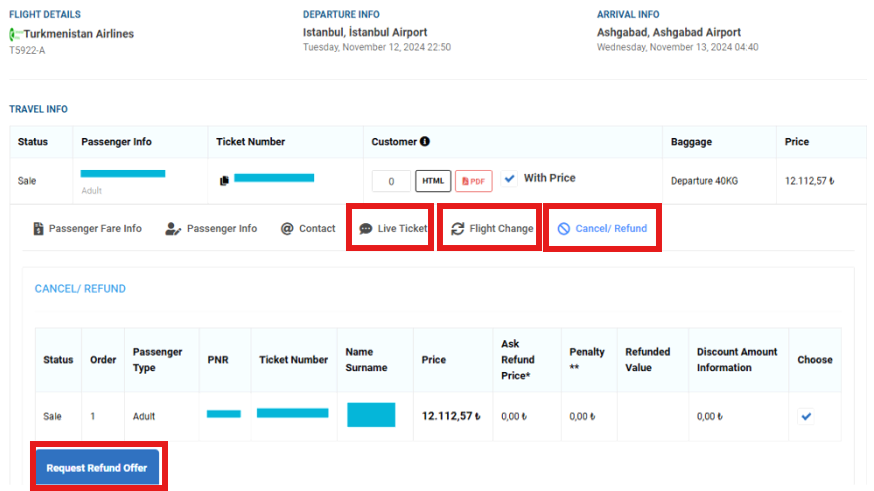
Firstly in our portal from the top menu,hover over Transactions. In dropdown menu navigate to Sales and Reservations. By filling one or more of the textboxes(Name,Surname,Ticket Number,PNR,etc) in the opening page,find your reservation or ticket. After navigating to reservation or ticket details, you can see the buttons(inside red rectangle as in the image below). Via these buttons you can make requests by contacting our operation team.
-
Other than that, you can write to our operation team for such requests via this email [email protected]
- If the Status=Reservation and there is PNR, you can cancel the reservation by using RemoveProduct method.
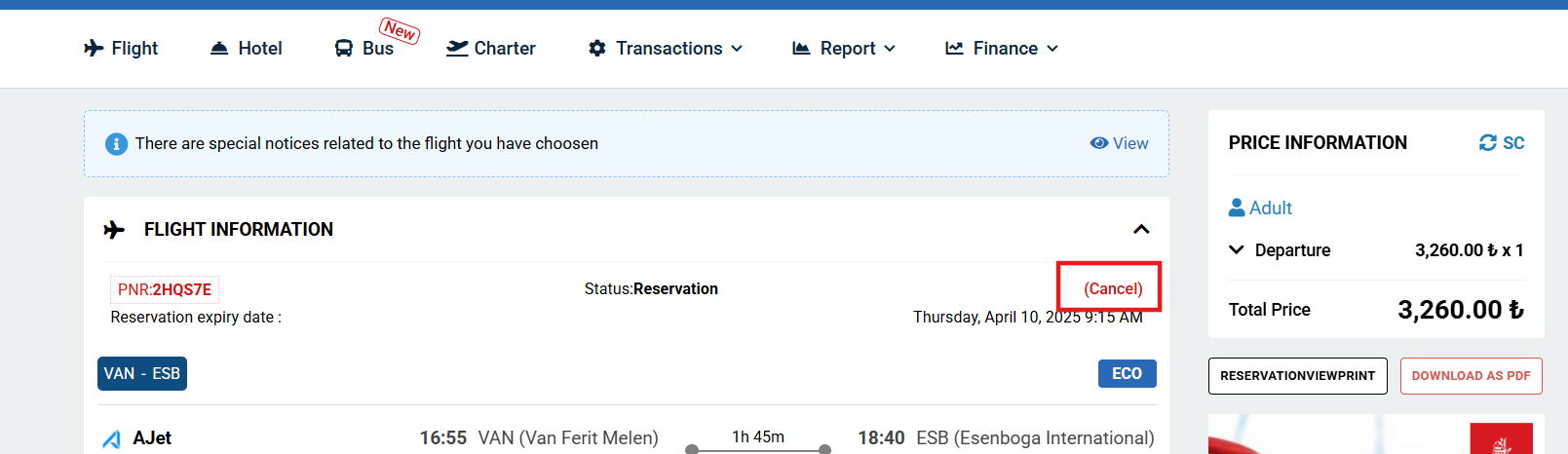
You can also remove the reservation by pressing on "Cancel" button in the reservation details page from our Portal as in the image below.
What to do if we encounter a change in price,flight info,baggage,or any other information?
As Biletbank, we present airline and provider data in real time. When any airline or provider makes a change to their data, we immediately reflect the updated information to you. These changes may occur in any of our methods during your transactions. Unless an error is returned by our system, it is your responsibility to validate the response of each method. Upon detecting a change, it is at your discretion to either accept the updated data and continue with the remaining processes, or reject it and terminate the transaction.
How do we know if there is a price change during the process?
- From the Allocate method to the FinalizeShopping method, the IsPriceChanged parameter is returned in all methods. If this parameter is True in any method, it means that there has been a price change in any item. This parameter needs to be checked each time.
How do we know if there is a change in flight information during the process?
- From the Allocate method to the FinalizeShopping method, the IsFlightInfoChanged parameter is returned in all methods. If this parameter is True in any method, it means that there has been a change in flight information. This parameter needs to be checked each time.
Selecting flights from the RecommendationBox in OW flights:
- To select a one-way flight from the RecommendationBox, the ProductId value of the box containing the relevant flight in the AirSearch response and the FlightId value of that flight should be sent in the Allocate step within the SelectedItems as ProductId and SubOptions respectively.
Entering incorrect FlightId value from the RecommendationBox in the Allocate method for RT flights:
- In the RT AirSearch response, the FlightId of both the outbound and return flights should be selected from the same RecommendationBox. An error occurs in the Allocate method if the FlightId for the outbound and return flights is selected from different RecommendationBoxes. Both the outbound and return FlightIds should be under a single ProductId within the SelectedItems in the Allocate method with 2 SubOptions.
What is the IsReservable parameter?
- It is the parameter indicating whether the flights in the AirSearch response allow reservations. For example, this field comes as False in charter flights with providers like TravelFusion or AirAys.
Error in using the IsCity parameter:
- The IsCity parameter can be sent as True for city codes found in the CityCode field in the AirPort list on the document address. For example, ESB is the airport code but ANK is the city code. The IsCity parameter should be sent as false for ESB searches and true for ANK searches. Searches with CityCode will return results from all airports in that city.
Using the IfRefundablesOnly parameter:
- Sending the IfRefundablesOnly parameter as True during the AirSearch Request brings refundable flights. These flights are more expensive than others. For the cheapest flights, this parameter should be False.
About the GetCurrentXRate method:
- The GetCurrentXRate method is used for conversions from TRY to other currencies. There is no information in the existing document.
About the GetRules method:
- The GetRules method is used to view the rules of flights provided by Amadeus. There is no information in the existing document.
About the MarketingAirline and OperatingAirline parameters:
- MarketingAirline is the airline that sells, and OperatingAirline is the airline that operates the flight. There is no information in the existing document.
About the use of ModifiedPassenger:
- In the UpdatePassenger step, the normal flow is carried out within the newpassenger object. When there is an error related to one of the passenger details, agencies used to correct the erroneous information within the ModifiedPassenger object and continue from where they left off. However, after the development of the error message that the same basket code cannot be processed, the ModifiedPassenger object needs to be reactivated in the UpdatePassenger method.
About the CombinablePrice parameter:
- The CombinablePrice parameter works in B2B but not in B2C during INT RT AirSearch. In B2B, the flights come in FlightOption in the query results where this parameter is sent as true, and the requirement to select the outbound and return flights from the same box in RecommendationBox is eliminated, allowing multiple flights to be combined into a single basket on their own.
Selecting OW flights from FlightOption:
- The ProductId of the flight in the FlightOption should be sent in the SelectedItem - ProductId parameter in the Allocate method.
Selecting RT flights from FlightOption:
- The ProductIds of the outbound and return flights in the FlightOption should be sent in the Allocate method within the SelectedItem - 2 IO_AllocationItem - ProductId parameters, the first for outbound and the second for return.
Airport list:
- Since the list on the document address is not constantly updated, it is retrieved from the DB and sent upon each request.
Airlines list:
- Since the list on the document address is not constantly updated, it is retrieved from the DB and sent upon each request.
About the number of adult passengers:
- A maximum of 9 adults can be queried in the API.
Entering mileage information:
- The mileage information needs to be entered in the FrequentFlayerNo parameter in the UpdatePassenger method. There is no information in the existing document.
Are passport details mandatory?
- PassportCountry, PassportNo, PassportValidDate, and Nationality are mandatory.
What should be done when “Unexpected provider error during the reservation process” is returned from MakePrebooking?
- This error is caused by the airline/provider and indicates that the reservation could not be completed due to a provider-side issue. After receiving this error, the current flow must be stopped, Allocate must not be called, the same ProductId must not be reused, and a new search (AirSearch) must be performed to start a new booking process with newly returned ProductId(s).